5-Load Estimation
The load of ammonium and/or nitrate to the receiving water bodies is estimated using the mass balance method. Using nitrate load estimation as an example, the mass balance equation contains three terms: the nitrate load rate to the waterbodies (Mout), the mass input load rate from the source (Min), and the mass removed by denitrification (Mdn). Mout is calculated by subtracting Mdn from Min. If Min is not specified, the Transport Module calculates Min by considering the mass inflow from both advection and dispersion. Mdn is calculated on a plume-by-plume basis using the definition of first-order decay. The output of the Load Estimation Module is a comma-separated value (CSV) text file consisting of a list of nitrate load estimates for water bodies that intersect a plume. Furthermore, estimates are given for nitrogen plumes that do not intersect a water body, which receives the unique water body feature identification of -1.
The Load Estimation Module uses the Transport Module output to simulate the mass input load of ammonium and nitrate entering the surface water body. As a reminder, the Transport Module outputs include the mass concentration of each plume for each OSTDS. The Load Estimation Module also simulates the mass of ammonium and nitrate removed by adsorption, nitrification, and denitrification from the plumes originating from the OSTDS. Furthermore, the module has a mass output load estimation for each water body (indexed by FID) and plumes that do not intersect a water body. The Load Estimation Module (Figure 2‑15) calculates the load to the target water body by summing the individual contributions of each plume for each water body.
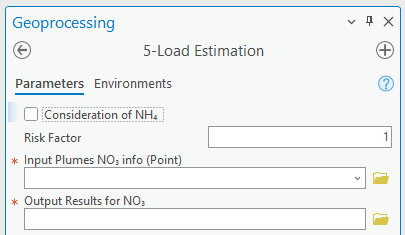
Figure 2‑15: The Load Estimation Module.
Input
Consideration of NH4: This option, shown in Figure 2‑16, allows for the consideration of NH4. By default, this option is unchecked. There are several options revealed when considering NH4:
Input Plumes NH4 info (Point): The Transport Module produces the auxiliary “_info” file for NH4 associated with the plume’s raster. The information in this file’s attribute table should not be manually modified.
Output Results for NH4: The output is a list showing the calculated load values for each water body. The default file name is the same as the input plumes “_info” shapefile, and the extension is CSV. The default storage location is the same as the input plume shapefile.
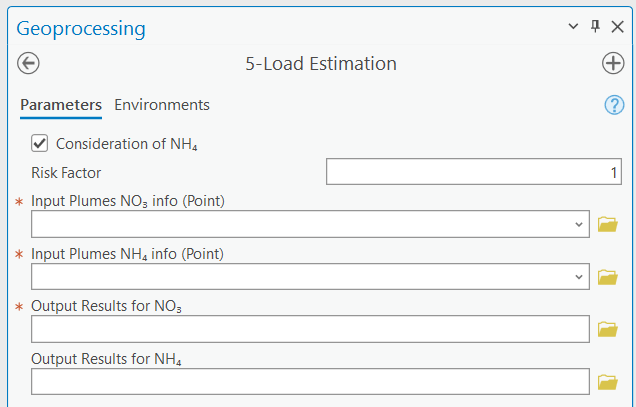
Figure 2‑16: The Load Estimation Module with Consideration of NH4.
Input Plumes NO3 info (Point): The Transport Module produces the auxiliary “_info” file associated with the plume’s raster. The information in this file’s attribute table should not be manually modified. Only point feature layers whose names have the “_info” suffix are shown in the dropdown menu.
Input Plumes NH4 info (Point): This file is the same as the Input Plumes NO3 info (Point) file but is for ammonium.
Options and Parameters
Risk Factor: The values in the Mass Output Load column are multiplied by the risk factor for each water body. The resulting number is then shown in the Mass Output Load x Risk Factor Column. The Risk Factor is applied to the load of both ammonium and nitrate. The user should determine the value of the risk factor based on his/her project needs. The default value of the risk factor is 1.
Outputs
Output Results for NO3: The output is a list showing the calculated load values for each water body. The output is exported to a tabular format, which can be opened in any spreadsheet program. A water body feature ID of -1 in the designation for all plumes that did not intersect a water body. The output columns are:
Water body FID: The Water body FID indicates where all flow paths terminate. The water body corresponding to this FID can be determined using the ArcGIS Pro Information tool or by opening the attribute table of the water bodies feature class and selecting the entry with the corresponding FID. The selection is then shown on the map.
Mass output load: The total estimated nitrate load to the water body with the given FID in mass units per time. The unit of mass is the same as the mass unit used in the source concentration (e.g., mg in mg/L). The unit of time is the same as the time unit used in the velocity flow field units calculated by the flow module (e.g., day in meter/day). This output load equals the Mass removal rate subtracted from the Mass input load.
Mass output load x Risk Factor: The Mass output load multiplied by the Risk Factor.
Mass removal rate: The total amount of mass removed due to denitrification, modeled as a first-order decay process in mass units per time. The units are the same as the units of Mass output load.
Mass input load: The total input mass flux rate into groundwater due to the constant concentration plane source of the Domenico solution, taking into account both advection and dispersion.
Output Results for NH4: The content of this output file is the same as that of the Output Results for NO3 but for ammonium.
Troubleshooting
Table 2‑9 lists some possible issues encountered during model execution, a probable cause, and a possible solution. The error messages may appear for reasons other than those listed. If you cannot find a solution to the issue, then please submit a [New issue] in the ArcNLET-Py GitHub repository (Issues · ArcNLET-Py/ArcNLET-Py · GitHub) as described in the GitHub instructions at Creating an issue - GitHub Docs.
Table 2‑9: The Load Estimation Module troubleshooting guide.
Error |
Cause |
Solution |
|---|---|---|
Error message “All plumes must be xxx” or “All plumes must have xxx” appears where xxx can be various messages. |
The likely cause is the user modifying the associated “_info” table generated by the Transport Module. The “_info” file must not be changed. |
Re-run the Transport Module. |