0-Preprocessing
The purpose of the Preprocessing Module (Figure 0-1) is to automatically extract soil properties from the SSURGO database to prepare three input files for ArcNLET-Py. Soil properties that this module can prepare include hydraulic conductivity, porosity, and soil types.
ArcNLET-Py also requires other input files, including DEM and water bodies shapefile. These two files need to be prepared by the user. DEM and water body data are easily downloaded from sites like the USGS The National Map (TNM) Data Download Application. An alternative data source for water bodies is the National Hydrography Dataset. Be mindful that water body data always requires manual revision by the user because of accuracy issues (i.e., missing ditches and canals).
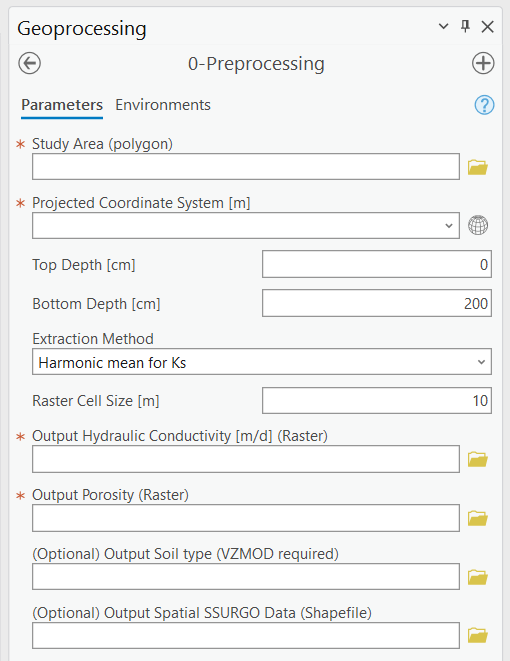
Figure 0-1: The Preprocessing Module in the Geoprocessing Pane.
Input Layers
Study Area (polygon): The area where users wish to extract soil properties from the SSURGO database. The input file must be a polygon with one feature. Note that the coordinate system of the file is not critical. Either a geographic coordinate system or a projected coordinate system works for the data extraction.
Options and Parameters
Projected Coordinate System: The projected coordinate system of the output files. If the study area is specified, this text box automatically shows the coordinate system of the study area. But if the coordinate system is a geographic coordinate system, there is an error.
Top Depth [cm]: A numeric value for upper boundary depth is used to extract data from the SSURGO database. 0 at ground level, increasing as you go down.
Bottom Depth [cm]: A numeric value for the bottom boundary depth is used to extract data from the SSURGO database. The bottom depth must be greater than the top depth, and the maximum value is 200 cm.
Extraction Method: Method to deal with the extracted SSURGO data. There are five options: Harmonic mean for Ks, Weighted Average, Dominant Component (Numeric), Min, and Max.
The weighted average means that parameters such as hydraulic conductivity and porosity are calculated by taking a weighted average both horizontally and vertically.
The harmonic mean for Ks is similar to the weighted average, except that in the vertical direction, Ks is calculated by a harmonic mean instead of a weighted average.
The dominant component means that the value of the parameters of the dominant component is used as the output.
The min/max means the minimum and maximum value of parameters is used as the output.
Raster Cell Size [m]: This is the resolution of the output raster files for hydraulic conductivity, porosity, and soil types.
Outputs
Output Hydraulic Conductivity (Raster): Hydraulic conductivity extracted from the SSURGO database. Unit m/d.
Output Porosity (Raster): Porosity extracted from the SSURGO database. Porosity is dimensionless, and it is a fraction number between zero and one given in SSURGO.
(Optional) Output Soil Texture (Raster): Soil type extracted from the SSURGO database and USDA classification standard. VZMOD requires this file, which may not be exported if the user does not use VZMOD.
Output Spatial SSURGO Data (Raster): Spatial division and data extracted from the SSURGO database are used to generate the three output files described above.
Notes
The tools extracted SSURGO data from the website https://sdmdataaccess.nrcs.usda.gov. Therefore, the Preprocessing Module requires access to the Internet.
The unit of hydraulic conductivity is m/d.
This module is developed based on the software soilDB, a soil database interface. More information on soilDB is available at https://cran.r-project.org/web/packages/soilDB/index.html.
Troubleshooting
Troubleshooting Table 0-1 lists some possible issues encountered during model execution, a possible cause, and a suggested solution. Note that the error messages may appear for reasons other than those listed. If you cannot find a solution to the issue, then please submit a [New issue] in the ArcNLET-Py GitHub repository (Issues · ArcNLET-Py/ArcNLET-Py · GitHub) as described in the GitHub instructions at Creating an issue - GitHub Docs.
Error |
Cause |
Solution |
|---|---|---|
|
Your computer is not connected to the internet. |
cess.nrcs.usda.gov. |
|
Your firewall or virus protector is blocking port 443. |
Make sure port 443 is accessible. If you do not have permission to change your firewall setting, then contact your system administrator or IT specialist. |